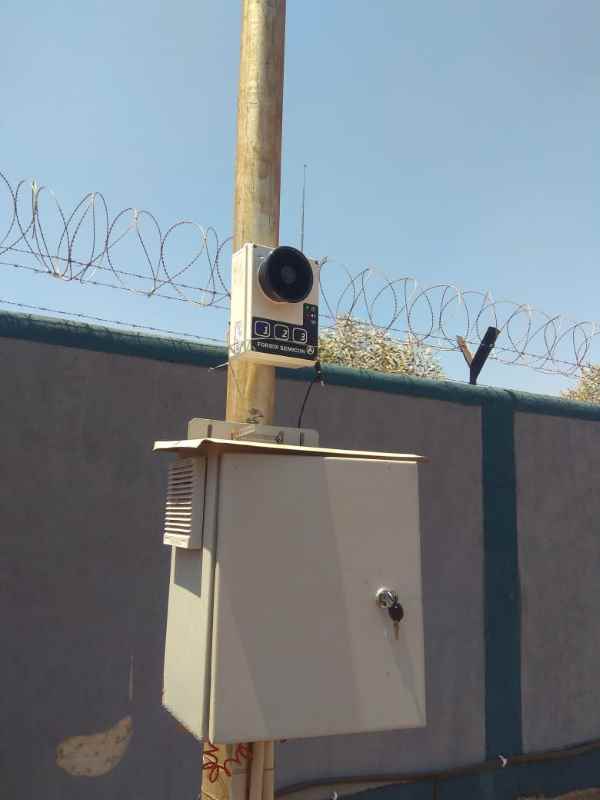
How to Modernize Guard Post Security with RF Wireless Duress Alerts

How to Modernize Guard Post Security with RF Wireless Duress Alerts

Understanding how to modernize guard post security with RF wireless duress alerts is essential for any organization serious about protecting its security personnel. Traditional security systems often leave guards vulnerable at remote posts, unable to quickly summon help during emergencies. RF wireless duress alert technology transforms this situation by providing instant, reliable communication that works across vast distances without infrastructure limitations.

This comprehensive guide explores modern wireless duress systems, their implementation strategies, and the critical role they play in creating safer working environments for security professionals.

What this article covers

This page explains how to modernize guard post security with RF wireless duress alerts: what the systems are, how they improve guard safety, range and deployment, and what to look for. All content is in plain text so it is accessible to everyone, including search engines.

Key takeaways

"Security guards face risks every day protecting people and property. RF wireless duress alerts reduce emergency response times by up to 60%, giving guards the confidence that help is always just one button press away."

The Security Guard Safety Challenge

Security personnel working at guard posts, perimeter checkpoints, and remote monitoring stations face unique occupational hazards. Unlike office workers surrounded by colleagues, guards often work alone at isolated locations—parking structures, warehouse entrances, construction sites, and facility gates where immediate assistance isn't readily available.

Traditional security communication relies on two-way radios or mobile phones, both of which require guards to consciously initiate contact and verbally communicate their situation. During a confrontation, assault, or medical emergency, these conventional methods often fail. A guard being attacked cannot easily reach for a radio and calmly explain their location and circumstances. This is precisely where RF wireless duress alerts become life-saving tools—enabling silent, immediate distress signals with a single concealed button press.

60%
Faster Response
500m+
Wireless Range
24/7
Always Active
<1s
Alert Time

Understanding RF Wireless Duress Technology

Radio Frequency (RF) wireless duress systems operate on dedicated frequency bands designed for reliable, interference-resistant communication. Unlike WiFi or cellular-dependent solutions, RF systems function independently of network infrastructure, ensuring operation even during power outages or network failures that might accompany security incidents.

Core System Components

A complete RF wireless duress alert system comprises several integrated components working together to ensure rapid emergency response.

RF Wireless Duress Alert System Components for Guard Post Security
Modern RF wireless duress systems integrate multiple components for comprehensive guard protection

Step-by-Step Implementation Guide

Successfully modernizing guard post security requires systematic planning and execution. Follow this structured approach to ensure effective deployment.

Step 1: Security Assessment

Begin with a comprehensive evaluation of your current security infrastructure and guard deployment patterns. Document all guard post locations, patrol routes, and areas where personnel work in isolation. Identify existing communication systems and their limitations during emergency scenarios.

Key Assessment Questions

Consider response time requirements—how quickly must help arrive at each location? Evaluate environmental factors including building construction materials that might affect RF signal propagation, outdoor versus indoor coverage needs, and extreme temperature or weather exposure for equipment.

Step 2: System Design

Based on assessment findings, design a system architecture that addresses identified vulnerabilities. Calculate required transmission range considering obstacles and interference sources. Determine the number and placement of receivers to ensure redundant coverage—no single point of failure should disable the entire system.

Step 3: Equipment Selection

Choose equipment rated for your specific environmental conditions. Industrial-grade transmitters withstand drops, moisture, and temperature extremes better than consumer-grade alternatives. Evaluate battery life specifications against your operational requirements—devices should function reliably through complete shifts without recharging.

Step 4: Installation and Configuration

Professional installation ensures optimal system performance. Receivers should be positioned for maximum coverage while remaining protected from tampering. Configure alert routing to appropriate response personnel and establish backup notification pathways.

Step 5: Testing and Validation

Conduct comprehensive testing from every guard post and patrol checkpoint. Verify signal strength throughout coverage areas, test response procedures, and confirm all personnel understand system operation. Document test results and address any coverage gaps before operational deployment.

Step 6: Training and Procedures

Train all security personnel on proper device use, including when and how to activate alerts. Establish clear response protocols defining who responds to alerts, escalation procedures, and post-incident reporting requirements. Regular drills maintain readiness and identify procedural improvements.

The most sophisticated security technology is worthless without proper training. Guards must instinctively know how to activate their duress devices and trust that help will arrive immediately.

— Security Industry Association, 2024

Advanced Features for Enhanced Protection

Modern RF wireless duress systems offer capabilities far beyond simple panic buttons. Understanding these advanced features helps organizations maximize their investment in guard safety.

Location Tracking Integration

Advanced systems incorporate location awareness, automatically identifying which zone or area triggered an alert. This information proves invaluable for rapid response—responders know exactly where to go rather than searching the facility.

Two-Way Communication

Some systems enable voice communication through the same devices used for duress alerts. After pressing the panic button, guards can communicate situation details if safely able to do so, improving response coordination.

Man-Down Detection

Accelerometer-equipped devices automatically detect falls or prolonged motionlessness, triggering alerts even when guards cannot consciously activate them. This feature addresses medical emergencies and assault scenarios where guards lose consciousness.

Check-In Systems

Programmable check-in requirements ensure guard welfare throughout shifts. If a guard fails to check in at scheduled intervals, the system alerts supervisors to investigate—catching problems before they become emergencies.

Integration Capabilities

Modern systems integrate with video surveillance, access control, and alarm monitoring platforms. When a duress alert activates, cameras can automatically focus on the alert location, access points can lock down, and external monitoring services receive notification.

ROI and Business Case Considerations

Justifying investment in RF wireless duress systems requires understanding both tangible and intangible benefits that extend beyond pure safety improvements.

Reduced Liability Exposure

Organizations bear responsibility for employee safety. Documented investment in modern safety systems demonstrates due diligence, potentially reducing liability in incident-related litigation. Insurance providers may offer premium reductions for facilities with comprehensive duress alert coverage.

Improved Guard Retention

Security personnel who feel protected and supported show higher job satisfaction and lower turnover. Given the costs of recruiting, hiring, and training security staff, improved retention delivers significant financial benefits.

Operational Efficiency

Wireless systems eliminate cabling costs and installation complexity associated with wired alternatives. Rapid deployment and easy reconfiguration accommodate changing security requirements without expensive infrastructure modifications.

Incident Prevention

Visible panic buttons and posted notices about duress alert systems deter potential aggressors. Many confrontations are prevented simply because perpetrators know immediate response will follow any attack on security personnel.

Maintenance and Ongoing Operations

Ensuring long-term system reliability requires establishing proper maintenance routines and operational procedures.

Regular Testing Schedule

Test every device monthly at minimum. Document test results and immediately address any failures. Periodic comprehensive tests from all coverage areas verify continued system integrity.

Battery Management

Establish battery replacement schedules based on manufacturer specifications and actual usage patterns. Maintain spare batteries and devices to ensure continuous coverage during maintenance activities.

System Updates

Keep firmware and software current to address security vulnerabilities and access new features. Work with system providers to understand update requirements and maintain support agreements.

What to Look For When Choosing an RF Wireless Duress System for Guard Posts

When evaluating systems for guard post security, focus on coverage, reliability, and ease of use.

Wearable and Fixed Panic Options

Choose systems that offer both wearable transmitters (for patrols and mobile guards) and fixed panic buttons at posts and checkpoints. Ensure activation is simple and works under stress.

Range and Repeaters

Confirm wireless range (e.g. 500m+) covers all guard posts and patrol areas. For large or multi-building sites, ensure signal repeaters are available and that the supplier can help with placement.

Central Receiver and Alert Display

The central receiver should show which device triggered the alert and, if applicable, location or ID. Alerts should be audible and visible so control room staff can respond immediately.

Battery Life and Testing

Check battery life for wearable and fixed devices and that testing (e.g. monthly) is straightforward. Documented test procedures help maintain long-term reliability.

Frequently Asked Questions About RF Wireless Duress Alerts for Guard Posts

What are RF wireless duress alerts for guard posts?

RF wireless duress alerts are panic systems that let security guards send an instant distress signal with one button press. Alerts go to a central receiver or control room via radio frequency, with no need for wiring or cellular networks.

How do RF wireless duress systems improve guard safety?

Guards can summon help in under a second without speaking or using a radio. Wearable panic transmitters and fixed buttons at posts provide reliable coverage; response times can improve by up to 60% compared with traditional methods.

What range do RF wireless duress systems have?

Many systems offer 500m or more in open space. Signal repeaters extend coverage for large sites, underground areas, and perimeter posts so every guard post is within range.

What should I look for when choosing a guard post duress system?

Look for: wearable and fixed panic buttons, central receiver with clear alert display, sufficient range (or repeaters), battery life and testing, and optional sirens or strobes. Ensure no wiring is required for deployment.

How long does it take to deploy RF wireless duress at guard posts?

Wireless systems can be deployed in days rather than weeks. No cabling means no construction; place receivers, repeaters, and panic buttons, then test. Staff training and procedures complete the rollout.

Understanding how to modernize guard post security with RF wireless duress alerts empowers organizations to significantly enhance protection for their security personnel. The technology has matured to provide reliable, cost-effective solutions suitable for facilities of any size. By following systematic implementation approaches and maintaining proper operational procedures, organizations demonstrate commitment to employee safety while reducing risk exposure and improving overall security effectiveness.

Ready to Enhance Your Guard Post Security?

Discover how FORBIX SEMICON® wireless panic alarm systems can protect your security personnel.

FS

FORBIX SEMICON®

Leading manufacturer of wireless panic alarm and duress alert systems for security, healthcare, and industrial applications. Trusted by security companies and facilities worldwide.

Share Your Thoughts

We value your feedback! Have questions about guard security systems or wireless duress alerts? Let us know.